
Virtual staging is a fast, affordable way to make empty homes more appealing to buyers. With 97% of buyers starting their search online, high-quality photos are critical. Fast Virtual Staging transforms empty or cluttered rooms into inviting spaces with photo-realistic images delivered in 12–24 hours for just $20 per image. Homes with staged photos sell 73% faster and for more money compared to unstaged properties. Here’s how it works:
- Step 1: Take high-quality photos of your property.
- Step 2: Upload them to Fast Virtual Staging.
- Step 3: Choose a design style (e.g., Modern, Farmhouse).
- Step 4: Receive staged images in 12–24 hours.
- Step 5: Upload the images to MLS, Zillow, and other platforms.
Virtual staging saves time and costs 97% less than physical staging, making it a smart choice for real estate professionals. By showing buyers a home’s potential, you can attract more interest and close deals faster.
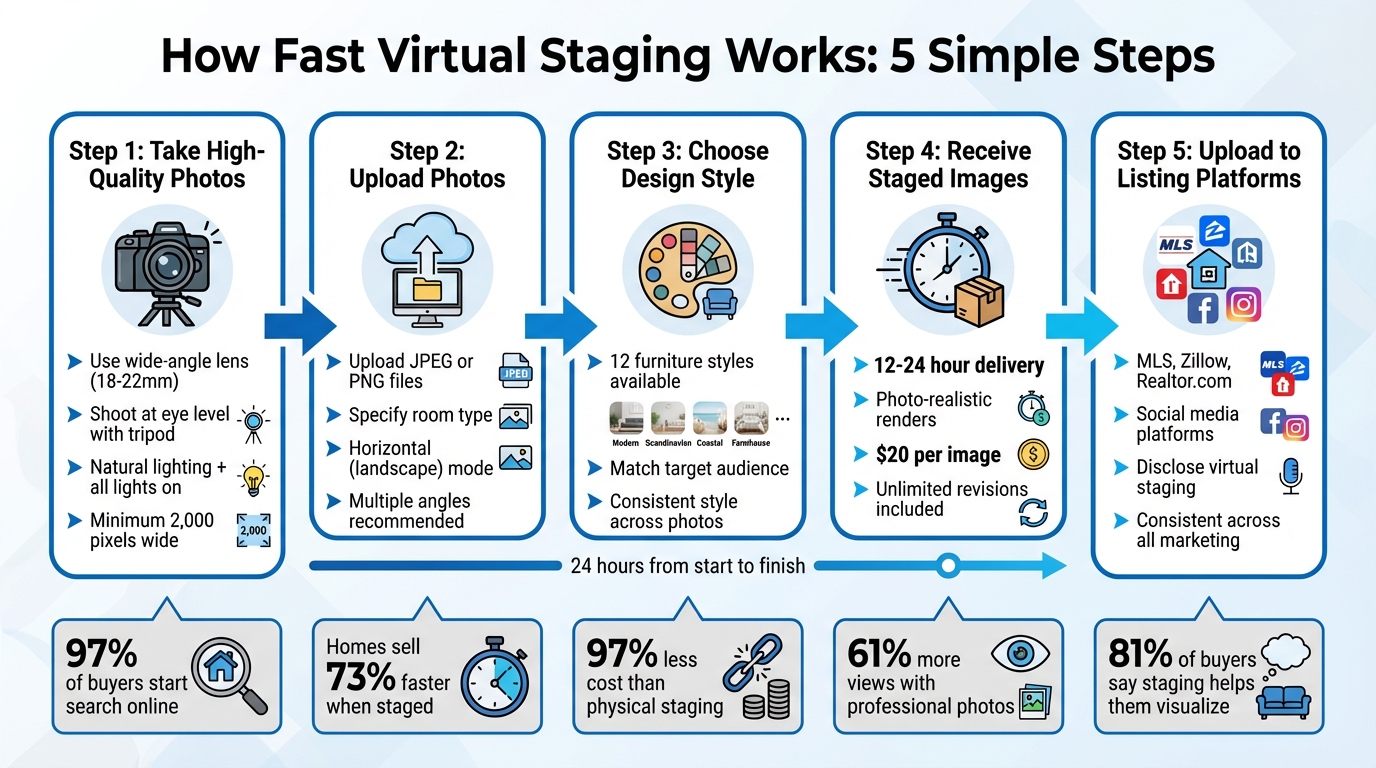
5-Step Virtual Staging Process: From Photos to Listing in 24 Hours
Automatic Virtual Staging
How to Use Fast Virtual Staging: Step-by-Step Process
Fast Virtual Staging makes it easy to enhance property listings with beautifully staged photos. Follow this five-step guide to take your property photos from ordinary to eye-catching, ready to impress potential buyers.
Step 1: Take High-Quality Property Photos
The quality of your photos sets the stage – literally. Start by capturing each room from a corner or doorway at eye level using a tripod for stability. A wide-angle lens (18–22mm for DSLR cameras) works best, but avoid ultra-wide or fisheye lenses as they can distort the room’s proportions, making furniture placement look awkward or unnatural.
Let in as much natural light as possible by opening curtains or blinds, and turn on all interior lights to eliminate dark areas. Make sure the room is tidy and free of distractions like cords, boxes, or pet items. For a complete view, take photos from opposite corners of the room.
If you’re using an iPhone, enable the grid feature to help with framing. Always shoot in the highest resolution available – especially important if the photos will be used for print marketing. Aim to take photos during the day, preferably on overcast days, to avoid harsh shadows and create soft, even lighting.
"Residential photography looks best when shot at eye level on a tripod." – Hailey Walk, Manager, Virtual Staging for Zillow
Step 2: Upload Photos to Fast Virtual Staging
Log into your Fast Virtual Staging account and click "Place Order." Upload your high-resolution JPEG or PNG files – images should be at least 2,000 pixels wide for the best results. Whether the rooms are empty or already furnished, the platform can handle virtual renovations or decluttering with ease.
When uploading, specify the type of room (e.g., living room, bedroom, kitchen) so the staging team can choose suitable furniture and decor. Wide-angle shots that show the floor, ceiling, and at least two walls work best. Always shoot in horizontal (landscape) mode for proper perspective, and avoid using zoom, as it can lower image quality. Consider uploading multiple angles of each room for clarity.
Step 3: Choose Your Interior Design Style
Fast Virtual Staging offers various design styles, including Modern, Scandinavian, Minimalist, Luxury, Coastal, Mid-Century Modern, Rustic, Farmhouse, and Traditional. Select a style that matches your target audience and the property’s location. For instance, Coastal designs are ideal for beachside homes, while Luxury or Traditional styles might resonate more with suburban family homes.
For urban apartments, Modern or Minimalist styles can make the space feel larger and more open. In smaller rooms, opt for scaled-down furniture to avoid a cramped appearance. Bedrooms often benefit from lighter tones and a welcoming, "hotel-like" vibe. Applying a consistent design style across all your photos not only creates a polished look but also builds trust with potential buyers. A cohesive presentation matters – 81% of buyers and renters say staging helps them visualize a property as their future home.
Step 4: Get Photo-Realistic Renders in 12–24 Hours
Once you’ve chosen your design style, the magic happens. Fast Virtual Staging delivers photo-realistic images within 12–24 hours, so you can quickly update your listings. Each image costs $20, and you’ll be assigned a dedicated account manager to ensure the final product meets your expectations. Need changes? Revisions are hassle-free.
This quick turnaround means you can list your property faster, giving you a competitive edge in the market.
Step 5: Upload Staged Photos to MLS and Listing Platforms
With your staged photos ready, upload them to MLS, Zillow, Realtor.com, and your social media platforms. Homes with professional photography receive 61% more views than those without, and staged photos can make your property stand out in online searches – where 97% of buyers begin their home-buying journey.
Be transparent by disclosing that the images are virtually staged, which helps build trust with buyers. Use these images consistently across all your marketing materials to create a strong, cohesive presentation that drives interest, showings, and offers. Virtual staging isn’t just about aesthetics – it’s a powerful tool to help your property sell quickly.
Why Fast Virtual Staging Drives Quick Home Sales
Staged homes sell 73% faster on average, and with over 90% of buyers starting their home search online, first impressions in digital spaces are more important than ever. Virtual staging gives sellers a powerful tool to create that all-important emotional connection.
By allowing buyers to instantly visualize a home’s potential, virtual staging helps eliminate hesitation and speeds up decision-making.
"If you have an empty house showing a living space that’s virtually or physically staged, you’re going to get the buyer to slow down and see a very beautiful interior, enticing them to schedule a showing rather than just viewing an image of an empty shell."
– Seth Greenwell, Senior Manager, ShowingTime+
Fast Virtual Staging has a clear edge over traditional staging. While traditional methods can take up to two weeks – factoring in movers, furniture rentals, and time-consuming setups – Fast Virtual Staging delivers photo-realistic renders in just 12–24 hours. This quick turnaround means your listing can go live almost immediately after the photos are taken. In competitive markets, where timing can be the difference between a sale and a missed opportunity, this speed is a game-changer.
The financial benefits are just as compelling. According to 23% of buyers’ agents, staging can increase a home’s offer value by 1% to 5% compared to similar unstaged properties. And at just $20 per image, virtual staging is far more affordable than the $500 to $5,000+ price tag of traditional staging. It’s a cost-effective way to attract serious buyers and maximize your home’s potential.
sbb-itb-7eef225
Fast Virtual Staging Pricing
Fast Virtual Staging keeps things straightforward with pricing that’s easy on the wallet. Their standard rate is $24 per image, but if you’re placing a larger order, you can snag a bulk discount that brings it down to $19.20 per image. That means you can virtually stage an entire property for less than $200 – making it a budget-friendly option for real estate professionals.
The pricing includes some great perks: unlimited revisions, a 100% money-back guarantee, and access to 12 furniture styles like Modern, Scandinavian, Farmhouse, Industrial, and Coastal. This variety allows you to customize the look to suit the home’s vibe and appeal to a wide range of potential buyers.
Speed is another huge advantage. Standard delivery takes just 12 to 24 hours, and if you’re in a rush, they offer a 4- to 8-hour turnaround at no extra charge for orders of up to 10 images. As long as you submit your order between 5 am and 3 pm PT, Monday through Friday, you can photograph a property in the morning and have beautifully staged images ready to list by the next day.
Here’s a breakdown of their pricing, turnaround times, and key features:
Pricing Details and Plan Options
| Service | Price | Turnaround | Key Features |
|---|---|---|---|
| Virtual Staging | $24/image ($19.20 bulk) | 12–24 hours (4–8 hours rush available) |
12 furniture styles, unlimited revisions, money-back guarantee |
| 360° Virtual Staging | $32/image | 8–48 hours | Includes immersive virtual tours |
| Image Enhancement | $1.20/image | 8–24 hours | Advanced color and lighting corrections |
| Furniture Removal | From $0.50/image | 8–24 hours | Digital removal of clutter or outdated furniture |
| Specialized Edits | $4.80/image | 8–24 hours | Options for wall changes, floor changes, and twilight sky effects |
| Virtual Renovation | $90 (interior) / $140 (exterior) | 2–5 days | Structural changes such as walls, windows, and doors |
| Enterprise | Custom pricing | Custom | API integration, high-volume controls, and custom billing |
For those managing high-volume projects or needing custom workflows, the Enterprise plan offers tailored solutions like API integration and streamlined billing. Additionally, the Furniture Removal service is perfect for clearing out cluttered or outdated rooms, giving buyers a blank canvas to imagine their dream home.
Conclusion
Fast Virtual Staging delivers a quick and cost-effective way to grab the attention of online buyers. With turnaround times between 12 and 24 hours and pricing starting at just $20 per image, you can list properties almost immediately after a photo shoot. This speed is crucial in today’s market, where 90% of buyers begin their home search online . The numbers don’t lie – virtual staging offers a clear edge over plain, unstaged listings.
Here’s the strategy in a nutshell: focus on staging the most impactful spaces – like the living room, primary bedroom, and kitchen. These are the areas that create emotional connections with buyers. At the same time, be upfront about using virtual staging to maintain trust. Tailor your design to match your target audience – think sleek Modern styles for city dwellers or breezy Coastal looks for beachfront homes. This thoughtful approach can spark the emotional responses that lead to faster offers.
"Virtual staging has helped our clients get their listing ready to market in a fraction of the time and reduce the cost it takes to physically stage a place." – Jonathan Davis, Spaces808
With unlimited revisions and customizable design options, Fast Virtual Staging equips you to thrive in today’s online-driven real estate world. Highlighting a property’s potential within 24 hours isn’t just convenient – it’s the edge you need to close deals faster and at better prices.
FAQs
How does virtual staging save time and money compared to traditional staging?
Virtual staging offers a budget-friendly and efficient alternative to traditional staging. While traditional staging can set you back anywhere from $2,000 to $2,400 per month, virtual staging is far lighter on the wallet, typically costing just $10–$50 per photo. That’s a potential savings of up to 96%.
It’s not just about saving money – it’s also a huge time-saver. Virtual staging is often completed in just 12–24 hours, whereas traditional staging might take 1–2 weeks to coordinate and execute. This rapid turnaround means you can create eye-catching property listings almost immediately, attracting buyers sooner and accelerating the home-selling process.
What design styles can I choose from with Fast Virtual Staging?
Fast Virtual Staging provides an array of design styles tailored to fit your property’s audience and aesthetic vision. Whether you’re leaning toward a chic, modern feel with minimalist furniture and airy layouts or a cozy, timeless charm with traditional decor, there’s a perfect option for every home and buyer’s taste.
Virtual staging allows you to showcase your property’s standout features by adjusting the decor to resonate with specific buyer groups. This adaptability helps craft visually appealing listings that grab attention and can speed up the selling process.
What can I do to make my photos perfect for virtual staging?
To achieve the best outcomes with virtual staging, start by capturing high-quality photos. Use a high-resolution camera like a DSLR or a mirrorless option with at least 24 megapixels to ensure your images are sharp and detailed. Lighting plays a huge role here – natural light is your best friend, so aim to take pictures during daylight hours when the rooms are naturally bright.
Before snapping any photos, ensure the space is clean and free of clutter. This helps showcase the room’s potential without distractions. Take shots from various angles to capture the full layout and dimensions of each room. Pay attention to framing and focus – these small details make it easier to seamlessly add virtual furniture and decor, resulting in images that feel realistic and welcoming.