
Virtual staging can cut weeks off your property preparation time and save you thousands of dollars. Instead of spending $2,000–$20,000 on physical staging and waiting 1–3 weeks, you can get photo-realistic images for just $20 per image, delivered in 12–24 hours. Listings with virtual staging get 40% more views, sell 73% faster, and attract 31% more inquiries. Here’s how it works:
- Upload photos: Drag and drop your property pictures in under 3 minutes.
- Choose a style: Select from 7 design options tailored to your target buyers.
- Quick delivery: Receive stunning, lifelike images in 12–24 hours.
- Request revisions: Make adjustments until the images are perfect.
Virtual staging eliminates the hassle of movers, furniture rentals, and property access coordination. It’s fast, affordable, and helps buyers imagine your property as their future home.
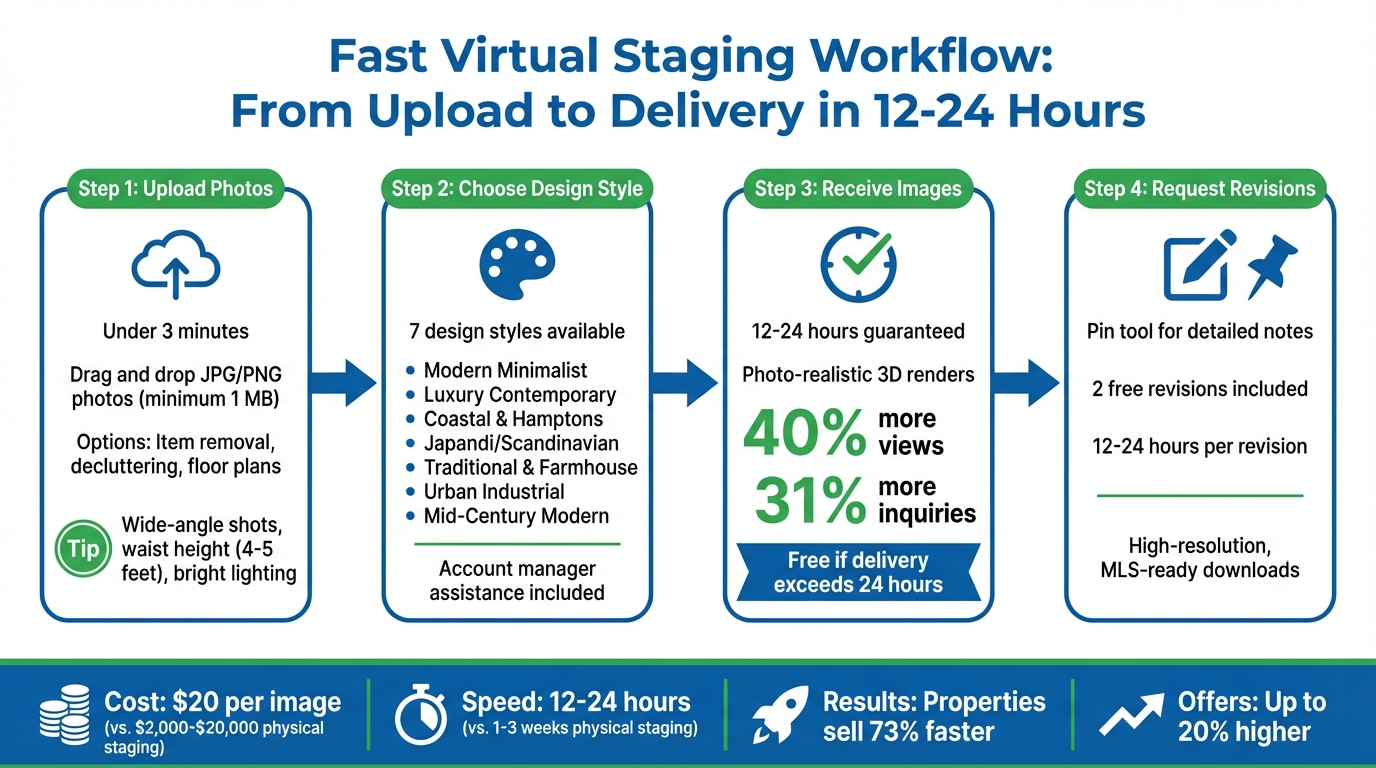
Virtual Staging Workflow: 4 Steps from Upload to Final Images in 12-24 Hours
Step 1: Upload Your Photos Online
Getting started is quick and simple – less than 3 minutes! After checkout, just drag and drop your JPG or PNG photos (make sure they’re at least 1 MB) using the upload buttons.
The platform works for both residential and commercial properties. If your space isn’t empty, choose the "Item Removal" or "Decluttering" option during upload. This ensures existing furniture is cleared before digital staging begins. You can also upload floor plans to help designers accurately determine room dimensions.
For the best results, take wide-angle shots that show at least two walls and the floor. Aim for waist height (around 4–5 feet) and use a tripod for steady shots. Open the blinds and turn on interior lights to keep the room bright and evenly lit.
"The platform was incredibly easy to use for staging my listings!"
– Brad Minhinnick, Director, LINK Property Management
Once your photos are uploaded, pick your preferred interior design style. Need help? Your dedicated account manager is ready to assist!
sbb-itb-7eef225
Step 2: Select Your Interior Design Style
Once you’ve uploaded your property photos, it’s time to choose from seven expertly curated interior design styles. These styles – Modern Minimalist, Luxury Contemporary, Coastal & Hamptons, Japandi / Scandinavian, Traditional & Farmhouse, Urban Industrial, and Mid-Century Modern – are designed to suit a variety of properties and buyer preferences. Your account manager will ensure your chosen style aligns with your property type and local buyer trends. Consistency across all rooms is a key focus, as buyers often rely heavily on photos when browsing listings online.
Match Design Styles to Your Buyers
Picking the right design style can make all the difference in how quickly your property sells. A style that resonates with your target audience can speed up your marketing efforts and even lead to offers that are up to 20% higher.
For condos and urban apartments, Modern Minimalist is a great fit. Its clean lines and neutral tones appeal to Millennials and Gen Z buyers, especially first-time homeowners. Luxury Contemporary styling, with its polished metallics and marble finishes, is ideal for high-end penthouses, helping justify a premium price tag. On the other hand, Traditional & Farmhouse styles work well for family homes in suburban areas, creating a cozy, inviting atmosphere with rustic wood and soft textiles.
If you’re selling lofts or downtown apartments aimed at creative professionals, Urban Industrial styling – featuring exposed brick, black metal, and concrete – adds a trendy, edgy vibe. For beachside properties, Coastal & Hamptons designs use light, airy colors and fabrics to evoke a relaxed, vacation-like feel. The platform makes it easy to create the look buyers expect.
| Interior Design Style | Ideal Property Type | Target Buyer Demographic |
|---|---|---|
| Modern Minimalist | Condos, apartments, new developments | Millennials, Gen Z, first-time buyers |
| Luxury Contemporary | Penthouses, executive homes, high-end apartments | High-net-worth, premium buyers |
| Coastal & Hamptons | Beachside homes, bright suburban properties | Lifestyle-seekers, vacation home buyers |
| Japandi / Scandinavian | Modern apartments, design-focused spaces | Design-conscious, wellness-focused buyers |
| Traditional / Farmhouse | Family homes, suburban, rural listings | Families, buyers seeking comfort or nostalgia |
| Urban Industrial | Lofts, renovated spaces, downtown apartments | Creative professionals, trend-focused buyers |
| Mid-Century Modern | Contemporary homes, living rooms, bedrooms | Buyers drawn to retro-modern or timeless design |
With the right style selected, your account manager ensures that every room reflects a cohesive and appealing vision.
Get Help from Your Account Manager
Your account manager plays a vital role in keeping the design consistent across all rooms. Mismatched styles can confuse buyers and even erode trust, so this attention to detail is crucial. Professionally staged spaces resonate with buyers – 81% say it helps them imagine a property as their future home.
They’ll also help you experiment with different approaches. At just $20 per image, you can stage the same room in multiple styles to see which garners the most interest – an economical alternative to traditional staging costs. Your account manager will guide you through design bundles that ensure the right balance of scale, proportion, and color, saving you time and effort.
"With endless revisions, AI decluttering with a click, and insider advice from a home staging professional, you’ll look like you have a whole team of experts behind you." – Amy Lang, Owner of Bridge City Staging
Step 3: Receive Photo-Realistic Images in 12-24 Hours
Once you’ve chosen your interior design style, the next step quickly transforms your vision into reality. After submitting your order, our expert 3D artists get to work, adding lifelike digital furniture to your photos. The result? Stunningly realistic renders delivered in just 12–24 hours. This fast turnaround not only improves image quality but also significantly reduces staging time, making it easier to move forward with your listing.
High-Quality Renders That Feel Real
What sets a great virtual staging image apart is the level of detail. Our talented artists ensure that every piece of furniture fits perfectly within your room’s dimensions. Realistic textures and natural lighting are carefully applied to make the space feel warm and inviting, helping potential buyers imagine themselves living there. This meticulous approach can increase listing views by 40%, boost inquiries by 31%, and even lead to offers that are up to 20% higher.
"Adding virtual furniture to my property photographs always generates increased interest in my listings. I can choose my own style of furniture and turn‐around times are super‐fast for the quality." – Jack Dangerfield, Real Estate Agent, Ray White
This dedication to detail ensures that the final images not only look amazing but also help you achieve better results.
Dependable 12–24 Hour Delivery
Speed and reliability go hand in hand with our service. We promise delivery within 24 hours, and if we miss the deadline, your order is free. This quick turnaround allows you to coordinate photography and listing launches within 48 hours, eliminating the long delays associated with traditional physical staging. Once the renders are ready, you’ll receive a download link via email. Plus, your account manager is available for two free revisions to ensure everything meets your expectations. These fast, polished images can help reduce the time a property spends on the market by up to 73%. Together, this efficiency and quality create a seamless virtual staging experience.
Step 4: Request Revisions and Download Final Images
Once your photo-realistic renders are ready, it’s time to fine-tune them to fit your vision perfectly. This step ensures the images align with your goals and resonate with your property’s target audience.
Make Changes Until You’re Satisfied
When you receive your images, take the opportunity to refine every detail before going live with your listing. The platform makes requesting revisions simple and intuitive. Just click the arrow icon on the image thumbnail or in the upper left corner of the image view to get started. Using the Pin tool, you can leave detailed notes on specific areas of the image – whether it’s swapping out a sofa, adjusting a rug’s color, or rearranging furniture to better highlight key architectural elements. Once you’ve added your notes, hit "Submit Revisions" to send your update request.
Need a different style to appeal to your audience? You can request changes like switching from Modern to Coastal for beachfront homes or opting for an Industrial look for urban lofts. With a quick 12–24 hour revision turnaround, you can make these updates without disrupting your timeline. Once the images meet your expectations, they’re ready to download.
Download Images Ready for Marketing
After finalizing the revisions, the images are available for immediate download in high resolution and formatted to meet MLS requirements. Be sure to check your local MLS guidelines for any specific watermark or disclosure rules.
These high-quality images are ready to use across all your marketing channels. Share before-and-after comparisons on social media to drive engagement. With visuals that generate 40% more online views and 31% more inquiries, you’ll have a competitive edge in attracting serious buyers. And with a cost of just $20 per image, this process saves both time and money compared to traditional staging methods – all while delivering professional results in just hours.
Time and Cost Savings: Virtual vs. Physical Staging
Virtual staging offers a faster and more affordable alternative to traditional staging, saving both time and money. Physical staging typically takes 1–2 weeks to coordinate vendors and complete the setup, which can delay getting your property on the market. Empty rooms during this time may fail to attract buyer interest. In contrast, with Fast Virtual Staging, you can receive high-quality, photo-realistic images within just 12–24 hours, allowing you to list your property while market interest is still strong.
The cost difference is equally striking. Traditional staging can range from $2,000 to $20,000, depending on factors like property size, rental duration, and labor fees for designers and movers. Virtual staging, however, costs only $20 per image. This eliminates expenses for furniture rentals, moving teams, storage, and insurance. Plus, you pay once and can use the images for the entire duration of your listing.
Virtual staging isn’t just about saving money and time – it also simplifies the process. It removes the need for vendor coordination and eliminates the risk of property damage during setup. Want to switch the style from Modern to Coastal for a beachfront property? With virtual staging, you can make that change digitally without incurring additional setup costs or delays.
Comparison Table: Speed and Cost Differences
Here’s a quick look at how virtual staging stacks up against physical staging:
| Feature | Physical Staging | Fast Virtual Staging |
|---|---|---|
| Average Cost | $2,000 – $20,000+ | $20 per image |
| Turnaround Time | 1–2 weeks | 12–24 hours |
| Logistics Required | Multiple vendor coordination | Online photo upload only |
| Flexibility to Change Styles | Expensive and time-consuming | Rapid digital revisions |
| Physical Risk to Property | Potential damage during moving | Zero physical impact |
| Online Listing Impact | High (one style only) | High (multiple styles available) |
The advantages of virtual staging are clear. Virtually staged listings attract 40% more online views and generate 31% more inquiries compared to non-staged properties. Additionally, 83% of buyers’ agents report that staging helps clients visualize a property as their future home. By spending less, listing faster, and drawing in more serious buyers, virtual staging eliminates the hassles of traditional staging while delivering excellent results for real estate professionals.
Conclusion
Fast Virtual Staging is revolutionizing how real estate professionals prepare their listings. By cutting the traditional staging timeline from 7–14 days to just 12–24 hours, it offers a faster, more efficient alternative. And at only $20 per image, it eliminates the hefty costs and logistical headaches of physical staging – no need for movers, furniture rentals, or coordinating property access.
The numbers speak for themselves: virtually staged listings attract 40% more online views and generate 31% more inquiries than non-staged properties. Plus, 83% of buyers’ agents say staging helps clients picture properties as their future homes. With this streamlined process, you can list properties while market interest is high, showcase multiple design styles to cater to diverse buyers, and make revisions until everything feels just right. The result? Faster sales and more engaged buyers.
FAQs
What kinds of photos work best for virtual staging?
High-quality, well-lit photos are key when it comes to virtual staging. Photos that clearly show the entire room and emphasize its standout features make it much easier to add digital furniture in a way that feels natural and appealing. To get the best results, ensure the room is clean, free of clutter, and photographed from angles that highlight the layout effectively.
Can you stage an occupied room and remove existing items?
Yes, virtual staging can digitally remove existing furniture or items from photos of occupied rooms, giving them a clean, move-in-ready appearance. This process is entirely digital, meaning no physical furniture needs to be shifted, allowing for a fast and seamless transformation without compromising on image quality.
Do I need to disclose virtual staging on the MLS?
Yes, virtual staging must be disclosed in MLS listings to meet regulations and maintain transparency. It’s crucial to clearly label and mention it in the listing description, ensuring potential buyers or agents are fully informed and any confusion is avoided.